
 GUIDED & FEEL
Five slow breaths, guided by touch
Rest a finger on the circle. The app guides you through five slow breaths: in for 4, hold for 2, out for 6.

Android app. No account. No ads. Works offline.
What it is
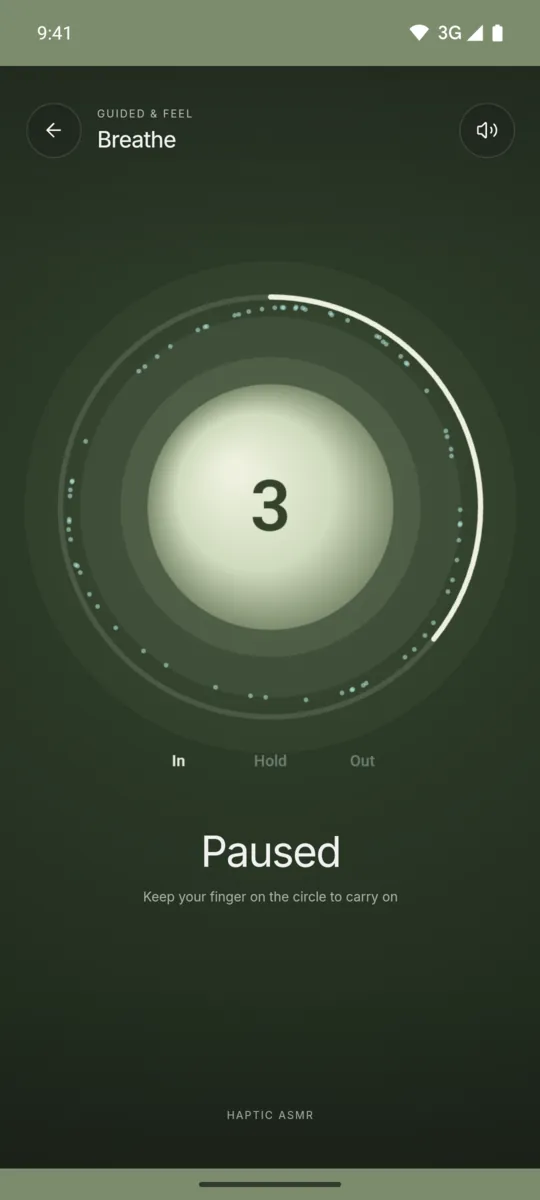
Breathe is a short guided breath with a countdown. Each round has three phases: breathe in for 4 seconds, hold for 2 seconds, and breathe out for 6 seconds. After five rounds, the session ends.
You must keep your finger on the circle to continue. If you lift it, the guide pauses until you touch the circle again. Taps and chimes mark each phase, so you can use it with your eyes closed.
How to use it
- Open Haptic ASMR and tap Breathe.
- Rest a finger on the circle.
- Breathe in, hold and breathe out as the guide shows.
- Keep your finger on the circle for all five rounds.
- Touch the circle again to repeat the session.
What you feel
Taps come faster as you breathe in. They pulse slowly while you hold, and they ease off as you breathe out.
What you hear
A soft chime plays at each change of phase. A soft tone plays under the breath.
When to use it
- Before you start a meeting.
- At the end of a long screen session.
- When you want a quiet minute without looking at the screen.
Questions
What breathing pattern does it use?
It uses five rounds of in for 4 seconds, hold for 2 seconds and out for 6 seconds. A countdown shows the time left in each phase.
Can I use it with my eyes closed?
Yes. Taps change with each phase and a soft chime marks every change. Keep a finger on the circle to continue.
More feels like Breathe
See all 52 feels

BREATHE AND 51 MORE
Feel it on your phone.
The haptics work on your phone. The website shows the app only.