
 STROKE & FEEL
Brush on Velvet
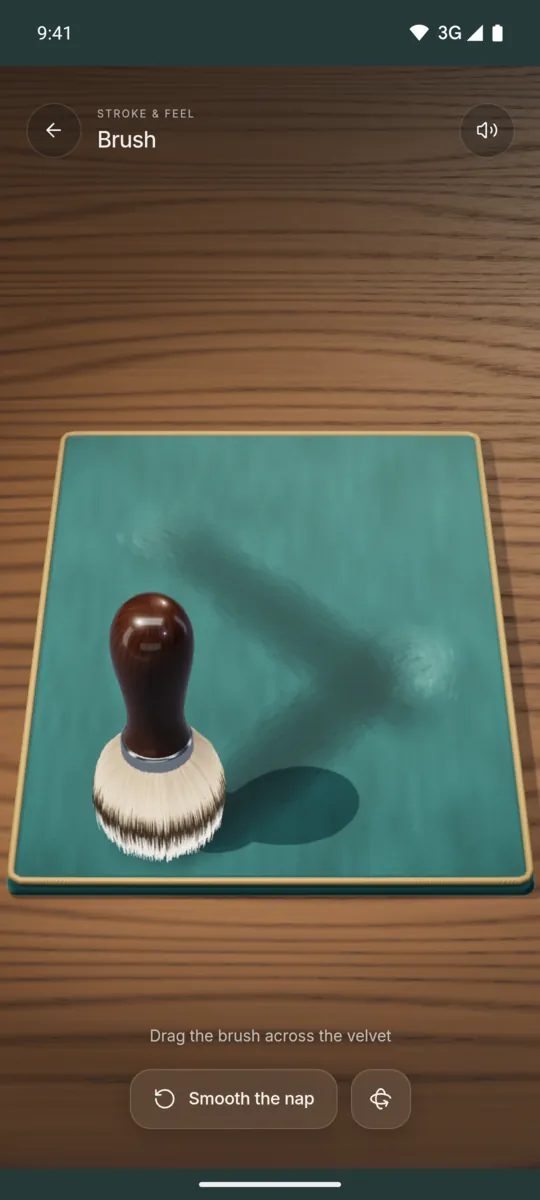
Drag a soft badger brush across a deep teal velvet pad. The nap changes shade where you brush it.

Android app. No account. No ads. Works offline.
What it is
This feel shows a badger shaving brush and a velvet pad. The bristles splay and trail behind your stroke. When you lift your finger, they spring back with a small wobble.
The velvet nap gets darker or lighter in the direction you brush it. It keeps the trail, so you can draw lines and patterns. Tap Smooth the nap to make the pad even again.
How to use it
- Open Brush in Haptic ASMR.
- Put your finger on the velvet pad.
- Drag slowly to brush the nap.
- Brush in a different direction to change the shade.
- Tap Smooth the nap to clear the pad.
What you feel
A soft, low buzz follows the brush while you stroke. A small pulse marks the moment the brush touches the pad and when you lift it.
What you hear
You hear a breathy swish. It gets brighter and louder when you brush faster, with small fibre ticks inside it.
When to use it
- When you want a slow, quiet motion.
- Before you go to sleep.
- During a short pause at your desk.
Questions
Why does the velvet change colour?
The app copies how velvet nap looks darker or lighter when you brush it in different directions. The trail stays until you smooth the pad.
Can I feel the brush on any phone?
The vibration works on Android phones with a vibration motor. The strength depends on your phone hardware.
More feels like Brush
See all 52 feels
BRUSH AND 51 MORE
Feel it on your phone.
The haptics work on your phone. The website shows the app only.