
 CLICK & FEEL
Twelve mechanical keys to press
Chunky keys sink when you press them. What you type shows above the keyboard.

Android app. No account. No ads. Works offline.
What it is
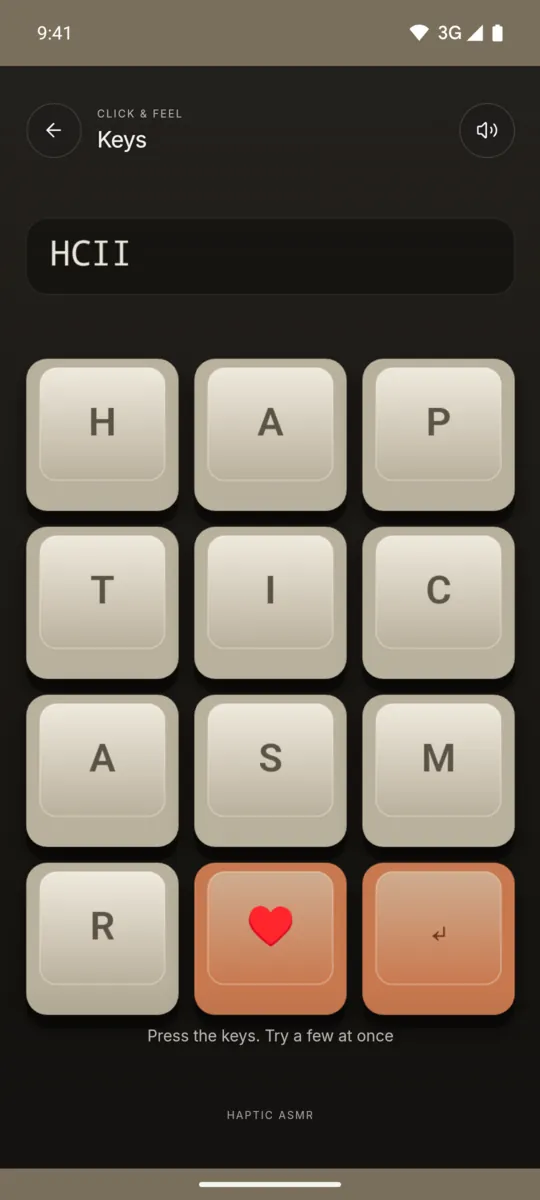
Keys is a small mechanical keyboard with twelve chunky keys. The keys spell HAPTIC ASMR, with a heart key and an enter key. Each key sinks when you press it and comes back up when you let go.
The letters you type appear in a line above the keys. Press the enter key to clear the line. You can press a few keys at the same time.
How to use it
- Open Haptic ASMR and tap Keys.
- Press one key and hold it down.
- Let go to feel the key come back up.
- Press a few keys at once.
- Press the enter key to clear the line.
What you feel
A deep thock comes when a key goes down. A lighter clack comes when it comes back up.
What you hear
Each key makes a low thock on the press and a short clack on release, like a mechanical keyboard.
When to use it
- When you miss the sound of a mechanical keyboard.
- While you wait for a file to download.
- During a short break from typing.
Questions
Does it sound like a mechanical keyboard?
The app makes a thock sound on each press and a lighter clack on release. All sounds are generated on the phone.
Can I type real text with it?
No. The twelve keys only spell the letters of HAPTIC ASMR, plus a heart and an enter key. It is a fidget, not a keyboard for other apps.
More feels like Keys
See all 52 feels
KEYS AND 51 MORE
Feel it on your phone.
The haptics work on your phone. The website shows the app only.